MyThinkPond

On Java, Python, Groovy, Grails, Spring, Node.js, Linux, Arduino, ARM, Embedded Devices & Web

Archive for October, 2016

Facebook’s 100-gigabit switch design is out in the open and promises faster speed

Posted by Venkatt Guhesan on October 20, 2016

Facebook’s 100-gigabit switch design is out in the open and promises faster speed

Wedge 100 specification has been accepted into OCP… upping the speeds to 100Gbps (bits per second).

Link to FBOSS code is all open sourced and available on GitHub here.

You can learn more about it here.

Posted in Technology | Tagged: , , | Leave a Comment »

Will the Real Schrodinger’s Cat Please Stand Up | Hackaday

Posted by Venkatt Guhesan on October 19, 2016

Interesting read on Schrodinger’s Cat and papers from Einstein.

The story of Schrodinger’s cat is well known, and one of quantum theory’s most popular phrases on the world stage. You can find his cat on t-shirts, bumper stickers, internet memes and the like. However, few know the origins of the cat, and how it came into being.

In this article we’re going to explore not so much the cat, but the meaning behind the thought experiment and what it is meant to convey, while keeping it simple enough for anyone to understand.

— From HackADay.com

http://hackaday.com/2016/10/18/will-the-real-schrodingers-cat-please-stand-up/

Posted in General, Science and Technology | Leave a Comment »

Systemd – Progress Through Complexity | OCS-Mag

Posted by Venkatt Guhesan on October 19, 2016

http://www.ocsmag.com/2016/10/19/systemd-progress-through-complexity/

Posted in Linux | Leave a Comment »

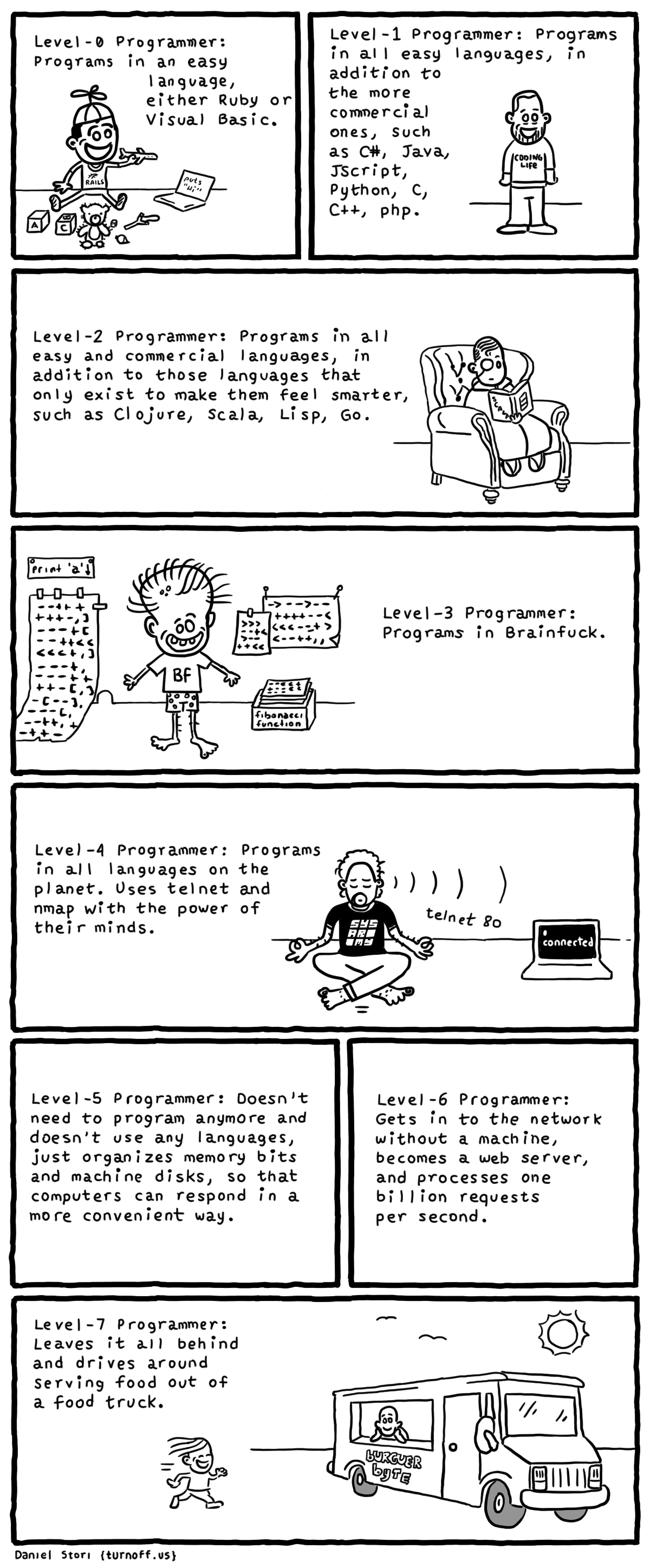
Programmer Levels - humor

Posted by Venkatt Guhesan on October 16, 2016

Credit: http://turnoff.us/image/en/programmer-levels.png

Posted in General, Inspirational | Leave a Comment »

Photos from the Basilica of the National Shrine of the Immaculate Conception

Posted by Venkatt Guhesan on October 14, 2016

nationalshrine

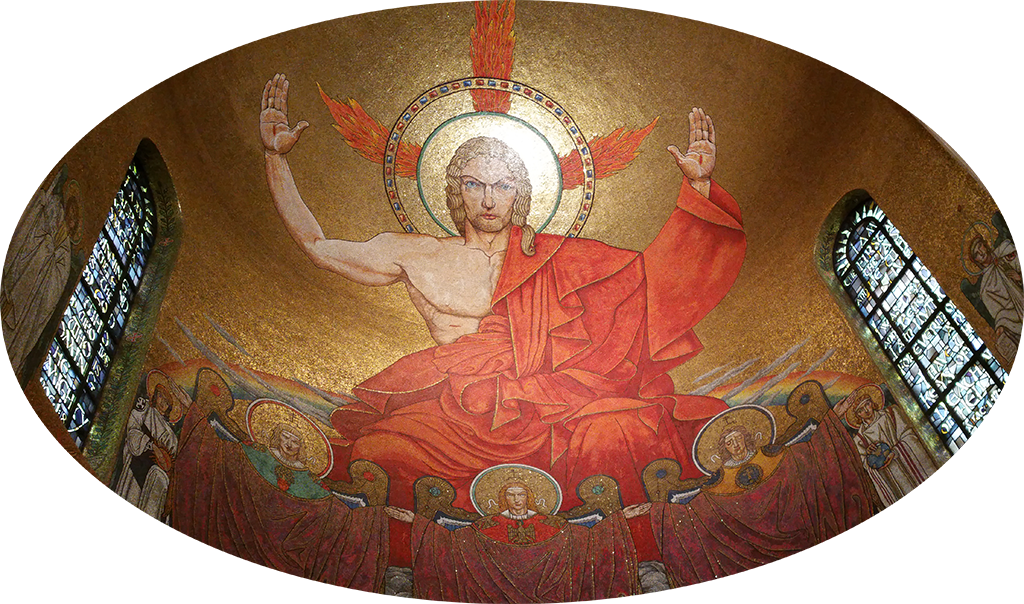
nationalshrineRecently visited the Basilica of the National Shrine and each time I visit this beautiful place I’m spellbound. It is one of the hidden gems to visit when you are visiting the capital. Here are some pictures from my recent visit.

Click here for the photos from the Basilica of the National Shrine of the Immaculate Conception in Michigan Avenue, Washington, DC. The beautiful murals are a work of art! Each and every space intricately carved and shaped full of love and celebration of the divine! It is one of my favorite places of worship!

I highly recommend everyone to visit.

Cheers!


Posted in General, Humanity, Inspirational, Travels | Tagged: , , | Leave a Comment »

It’s weekend!

Posted by Venkatt Guhesan on October 14, 2016

friday_joke_vguhesan_20161014To learn more about where the joke came from, click this link.

Posted in General, Inspirational, Life 101 | Leave a Comment »

How to package your node.js application for deploying it in an offline environment?

Posted by Venkatt Guhesan on October 14, 2016

Personally speaking, I prefer to have a self-contained bundle with all the artifacts and modules that might be required to deploy an application (not just Node.js application) in Production. In that way, I know exactly the bits that were installed and nothing more and nothing less. It also eliminates the availability of the NPM modules and network connectivity issues, etc. The following procedure shows you how to create a simple “Hello World” Node.js application with one dependency - Express.js (which has dependency on other modules) and to bundle (pack) it and deploy it to an environment that may not have an internet connection.

Brief Summary:
“bundledDependencies”: [“package-name1”] in the package.js does the trick in combination with “npm pack” and “npm install <Project>.tar.gz

Below is the step-by-step walk-thru.

So let’s get started:
In Development Computer:

Make sure you have Node.js installed and you can verify the installation by running:

$node -v
v6.8.0

Now let’s get started on a simple “Hello World” - Node.js project:

Follow the steps outlined here for setting up a simple Hello World using Node.js and Express. In my case, running “npm install express -save” created additional module dependencies on the following:

$npm install express --save
guhelloproject
└─┬ [email protected]
├─┬ [email protected]
│ ├─┬ [email protected]
│ │ └── [email protected]
│ └── [email protected]
├── [email protected]
├─┬ [email protected]
│ └── [email protected]
├── [email protected]
├─┬ [email protected]
│ ├── [email protected]
│ └── [email protected]
├── [email protected]
├─┬ [email protected]
│ └── [email protected]
├── [email protected]
├─┬ [email protected]
│ ├── [email protected]
│ └── [email protected]
├── [email protected]
├─┬ [email protected]
│ ├── [email protected]
│ ├─┬ [email protected]
│ │ ├── [email protected]
│ │ └── [email protected]
│ └── [email protected]
├── [email protected]
├─┬ [email protected]
│ └── [email protected]
├── [email protected]
└── [email protected]

Now edit, package.js and add define the bundleDependencies section like so:

{
  "name": "guhelloproject",
  "version": "1.0.0",
  "description": "",
  "main": "index.js",
  "scripts": {
    "test": "echo \"Error: no test specified\" && exit 1"
  },
  "author": "",
  "license": "ISC",
  "dependencies": {
    "express": "^4.14.0"
  },
  "bundledDependencies": ["express"]
}

Let’s create index.js

var express = require('express');
var app = express();
app.get('/', function (req, res) {
  res.send('Hello World!');
});
app.listen(3000, function () {
  console.log('Example app listening on port 3000!');
});

Test the code locally in development to ensure that it works.

$node index.js
Example app listening on port 3000!
# You should see "Hello World", if you point your browser to http://localhost:3000/

Now for the bundling magic.

$npm pack
guhelloproject-1.0.0.tgz

In your Production server (which has no internet connection):

  1. Make sure you install Node.js so that the Node executable is available. Verify once again by running “node -v” (as shown above)
  2. Move the “guhelloproject-1.0.0.tgz” file to the Production server.
$npm install guhelloproject-1.0.0.tgz
# This unzips the bundle into a 'node_modules' directory 
$cd cd node_modules/guhelloproject/
$node index.js
Example app listening on port 3000!

Point your browser to http://:3000/ and you should see “hello world”.

Posted in Javascript, Node JS | Tagged: , , | Leave a Comment »

Node.js, Python, C/C++, Ruby, PHP development from a tiny Linux embedded for about $10

Posted by Venkatt Guhesan on October 4, 2016

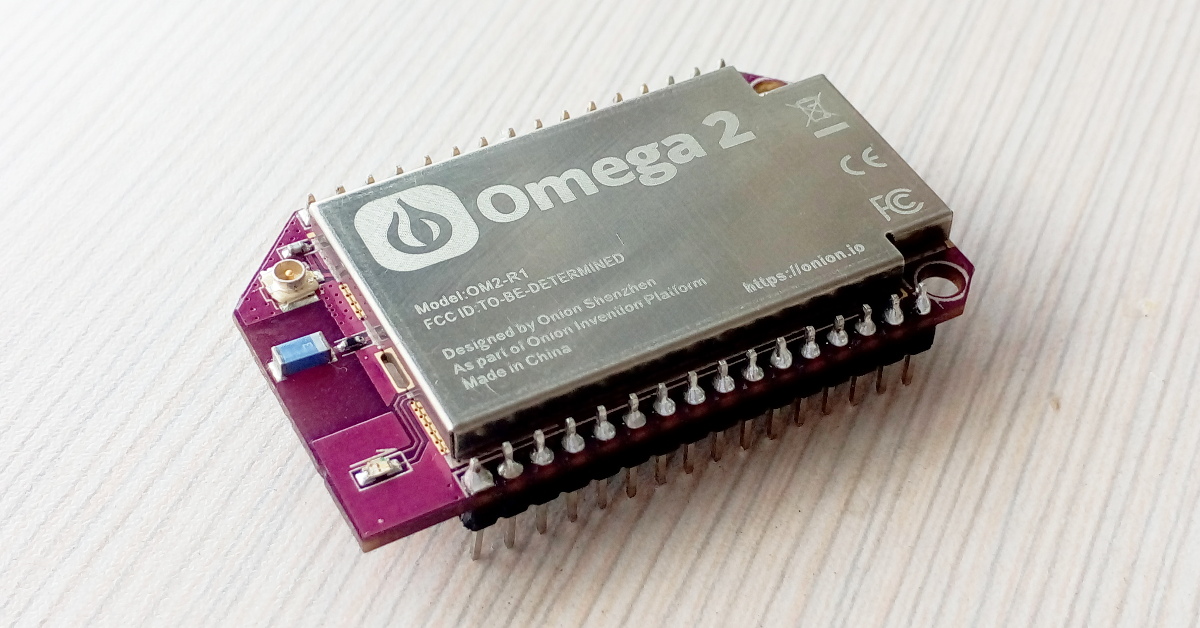
Came across this tiny IoT embedded micro-controller/computer that runs BusyBox or FreeBSD Linux and can run code written in Node.js, Python, C/C++, Ruby and PHP all at a cost of $5 to $10 with WiFi, 2G/3G, Bluetooth, GPS add-ons for your cloud services. It also has enough GPIO pins to interface with external world and not to mention the I2C and I2S interfaces for talking to other devices and peripherals as well as interfacing for sounds (I2S).

Omega2 from onion.io

For that price, it might be worth considering it!

Posted in Embedded Systems, Linux | Tagged: , , , , , , , | Leave a Comment »

First baseball game ever at Yankees Stadium, Bronx - Yankees vs. Orioles

Posted by Venkatt Guhesan on October 3, 2016

First baseball game ever! Pictures from the Yankees Stadium, Bronx - Yankees vs. Orioles. Unfortunately Orioles lost that game on Saturday. They won the game on Sunday 5-2.

Posted in General, Outdoors & Nature, Travels | Tagged: , | Leave a Comment »