MyThinkPond

On Java, Python, Groovy, Grails, Spring, Node.js, Linux, Arduino, ARM, Embedded Devices & Web

Posts Tagged ‘Java’

Grails 2.3.5 - grails stop-app - does not stop the app running via run-app

Posted by Venkatt Guhesan on February 2, 2014

If you’re using Grails 2.3.X and you’re developing, most likely you’re running your app like this:

grails run-app
#in one command-prompt/shell-terminal and
grails stop-app
#in another command-prompt/shell-terminal

With the latest version of Grails (version 2.3.5), the stop-app say:

grails stop-app
| Server Stopped
# But nothing happens and the server-process continues to run#

Here’s an undocumented fix that can come in handy:

# On terminal/command-prompt #1
# Run the way you do today
grails run-app
# On terminal/command-prompt #2, change-directory (cd) to the root folder where you have your Grails project
# Create a file with a file-name ".kill-run-app"
# For Linux (*Nix) environments
touch .kill-run-app
# For Windows where you do not have 'touch' command do the following instead
echo hello > .kill-run-app
# Wait for a few seconds and Grails will kill the app that's running

Now you can resume with starting a new instance of “grails run-app”.

Cheers & Happy Coding!

Posted in Grails, Groovy, Java | Tagged: , , , , | Leave a Comment »

Grails 2.X .gitignore file

Posted by Venkatt Guhesan on November 16, 2013

Grails

With a new Grails 2.X project you run into challenges on which folders to check-in into a GIT repository. You want to remove any non-essential files that Grails can rebuild at run-time. And if you are using either GITHub or BitBucket for your GIT repo’s the default .gitignore file created or provided by GITHub is setup for configured for a Grails 1.X project and not a Grails 2.X project.


So here are a few simple steps to help you create the correct .gitignore file for a Grails 2.X project:

Step-1: Create the following .gitignore file under the root Grails project folder:

*.iws
*Db.properties
*Db.script
.settings
.classpath
.project
.idea
eclipse
stacktrace.log
target
target-eclipse
/plugins
/web-app/plugins
/web-app/WEB-INF/classes
web-app/WEB-INF/tld/c.tld
web-app/WEB-INF/tld/fmt.tld

Step-2: Git does not allow you to check in empty (but essential folders). To avoid this you can run the following command:

find . -type d -empty -exec touch {}/.gitignore ;

The above command creates a empty “.gitignore” file below all folders. And since you now have non-empty folders, you can now check them in into Git so that if you check-out/clone the project in the future, you will have those essential but empty folders.

If you find this article useful, Tweet me on your Twitter account or +1 me on Google-Plus so that others can also benefit from this information.

Cheers

Posted in Grails, Groovy, Java, SourceControl - GIT | Tagged: , , , , | 2 Comments »

Tomcat 6+: Infamous “SEVERE: Error listenerStart” message - How-To debug this error?

Posted by Venkatt Guhesan on July 1, 2011

I’m sure if you have been developing with Java and Tomcat for sometime, you are likely to run into the infamous debug error.

SEVERE: Error listenerStart

You will most likely start Googling it trying to find out what the heck is going on. And in trying to see the extended logging on what that “listenerStart” error means. After some lucky searches, you will see links asking you to drop a “log4j.properties” file under ‘/WEB-INF/classes’ directory inside your WAR to help debug which one of the listeners is throwing this crazy error.

Well, this advise will most likely work for you if you are developing under an earlier version of Tomcat. If you are using versions 6.0 or above then continue to read on…

In Tomcat 6 or above, the default logger is the”java.util.logging” logger and not Log4J. So if you are trying to add a “log4j.properties” file - this will NOT work. The Java utils logger looks for a file called “logging.properties” as stated here:
http://tomcat.apache.org/tomcat-6.0-doc/logging.html

So to get to the debugging details create a “logging.properties” file under your”/WEB-INF/classes” folder of your WAR and you’re all set.

And now when you restart your Tomcat, you will see all of your debugging in it’s full glory!!!

Sample logging.properties file:

org.apache.catalina.core.ContainerBase.[Catalina].level = INFO
org.apache.catalina.core.ContainerBase.[Catalina].handlers = java.util.logging.ConsoleHandler

and you will most likely see a “class-not-found” exception. ;-)

Look at the bright side, you’re now one step closer to the solution.

Happy coding!

Posted in Grails, Groovy, GWT, Java, Spring, Spring Framework, Tomcat, web development | Tagged: , , , , , | 23 Comments »

Add custom jars under “\WEB-INF\lib” in a Maven project

Posted by Venkatt Guhesan on October 2, 2010

The answer is a lot simpler than you think. But before we explore the answer, I should warn you that this approach is not what is recommended by Maven. Maven builds upon consistency and structure and this process goes away from that methodology. In Maven, you can take each of your jars\libraries and add them to your local repository and then include them as needed in your projects. If you want to go the proper route here’s how you do it. This keeps a consistent version in all your projects and can allow you to gracefully update the library as new versions become available.

But if you still want to go ahead and add these custom jars in your project then follow these steps:

1. Create a “lib” folder under your project like this: “\src\main\webapp\WEB-INF\lib”
2. Copy needed “jars” etc that you want included inside your WAR bundle folder.
3. Invoke your maven build as you normally do. I use “mvn install”, which creates builds the war file.

If you examine the WAR file, your jars that you included in step-1 and step-2 will be there.

Posted in Java, Maven, web development | Tagged: , , , | 3 Comments »

Maven - GWT - Vaadin - including additional custom jars in a maven project under “\web-inf\lib”

Posted by Venkatt Guhesan on September 15, 2010

With a lot of folks trying Google Web Toolkit (GWT) and\or Vaadin (combined with Maven), one of the problems that they might encounter is this:

How do I get my custom Vaadin themes or GWT jar files included under my “\web-inf\lib” folder inside the war

Here’s a link to the such a question in detail.

The answer is a lot simpler than you think. But before we explore the answer, I should warn you that this approach is going away from what Maven would like you to do. In Maven, you can take each of your jars\libraries and add them to your local repository and then include them as needed in your projects. If you want to go the proper route here’s how you do it. This keeps a consistent version in all your projects and can allow you to gracefully update the library as new versions become available.

But if you still want to go ahead and add these custom jars in your project then follow these steps:

  1. Create a “lib” folder under your project like this: “\src\main\webapp\WEB-INF\lib”
  2. Copy needed “jars” etc that you want included inside your WAR bundle folder.
  3. Invoke your maven build as you normally do. I use “mvn install”, which creates builds the war file.

If you examine the WAR file, your jars that you included in step-1 and step-2 will be there.

By the way, have you tried Vaadin lately? To summarize my experience with Vaddin… “It’s a breath of fresh air. Simple. Elegant. Concise.”

Cheers.

Posted in GWT, Java, Maven, Vaadin | Tagged: , , , | Leave a Comment »

GreaseMonkey to the rescue - fixing Apache Jackrabbit Site

Posted by Venkatt Guhesan on April 21, 2010

Starting yesterday the Apache JackRabbit JCR website had an interesting problem. Someone must have made a change to the base template such that they had removed the SyntaxHighlighter code that needs to be appended to the header. I’ve opened an issue in their jira issue tracker.

>>>>>>>> Contents of JIRA Issue >>>>>>>>
It started happening today. When I visit the website, for example:

http://jackrabbit.apache.org/node-type-notation.html

All the artifacts that contain a “SCRIPT” of type syntaxhighlighter does not get displayed.

So basically all examples on the site fails to show up.

Example:
Upon view-source, you will find artifacts like this:

<code>
<script class="toolbar: false; theme: default; brush: java; gutter: false" type="syntaxhighlighter">// <![CDATA[
 public class FirstHop { // Some Code... }
// ]]></script>
</code>

None of the artifacts that are using “syntaxhighlighter” gets displayed. Which leaves the site almost useless when it comes to documentation.

Problem must have started today (April 19, 2010) since I was able to see them last night.
>>>>>>>> Contents of JIRA Issue >>>>>>>>

But while I wait for a fix the site is pretty much unusable. Let me show you an example,
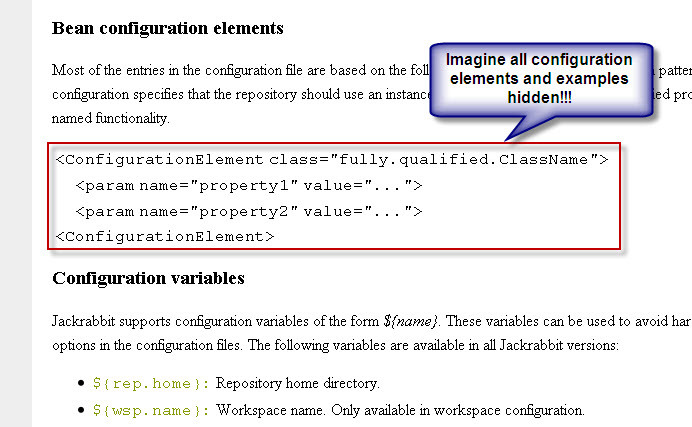
So essentially you have a website that has no examples, no configuration details, etc. While I wait for a fix (which can happen any day), I thought this is a good opportunity to whip out a Greasemonkey Script to fix the issue. So this article focuses on creating a GreaseMonkey script that addresses this issue in my browser while the site is broken.

Let’s first look at the problem:

Apache Jackrabbit site needs to include the following in their header tag:

<link href='http://alexgorbatchev.com/pub/sh/current/styles/shCore.css' rel='stylesheet' type='text/css'/>
<link href='http://alexgorbatchev.com/pub/sh/current/styles/shThemeDefault.css' rel='stylesheet' type='text/css'/>
<script src='http://alexgorbatchev.com/pub/sh/current/scripts/shCore.js' type='text/javascript'></script>
<script src='http://alexgorbatchev.com/pub/sh/current/scripts/shBrushJava.js' type='text/javascript'></script>
<script src='http://alexgorbatchev.com/pub/sh/current/scripts/shBrushXml.js' type='text/javascript'></script>
<script language='javascript'>
SyntaxHighlighter.config.bloggerMode = true;
SyntaxHighlighter.config.clipboardSwf = 'http://alexgorbatchev.com/pub/sh/current/scripts/clipboard.swf';
SyntaxHighlighter.all();
</script>

Using GreaseMonkey, you can insert any script at any point in the document or site (from the browsers perspective). So here’s the script that does that:

// ==UserScript==
// @name           Apache JackRabbit Script
// @namespace      jackrabbit.apache.org
// @description    fixes the SyntaxHighlighter
// @include        http://jackrabbit.apache.org/*
// ==/UserScript==
function addHeaderForSyntaxHighlighter(){
	var addStyle1 = document.createElement('style');
	addStyle1.type = 'text/css';
	addStyle1.link = 'http://alexgorbatchev.com/pub/sh/current/styles/shCore.css';
	var addStyle2 = document.createElement('style');
	addStyle2.type = 'text/css';
	addStyle2.link = 'http://alexgorbatchev.com/pub/sh/current/styles/shThemeDefault.css';
	var addScript1 = document.createElement('script');
	addScript1.type = 'text/javascript';
	addScript1.src = 'http://alexgorbatchev.com/pub/sh/current/scripts/shCore.js';
	var addScript2 = document.createElement('script');
	addScript2.type = 'text/javascript';
	addScript2.src = 'http://alexgorbatchev.com/pub/sh/current/scripts/shBrushJava.js';
	var addScript3 = document.createElement('script');
	addScript3.type = 'text/javascript';
	addScript3.src = 'http://alexgorbatchev.com/pub/sh/current/scripts/shBrushXml.js';
	var addBaseScript = document.createElement('script');
	addBaseScript.type = 'text/javascript';
	addBaseScript.src = 'http://www.avedatech.com/js/fixForJackRabbitSyntaxHighlighter.js';
	var headID = document.getElementsByTagName("head")[0];
	headID.appendChild(addStyle1);
	headID.appendChild(addStyle2);
	headID.appendChild(addScript1);
	headID.appendChild(addScript2);
	headID.appendChild(addScript3);
	headID.appendChild(addBaseScript);
}
addHeaderForSyntaxHighlighter();

The above greesemonkey script adds the styles and necessary javascript to the page so that all the artifacts that use the SyntaxHighlighter are displayed. I’m attaching the file here for anyone who wants to use it in their greesemonkey script in FireFox.

Greesemonkey JackRabbit Site Fix Script

If you have GreeseMonkey installed in your FireFox browser, you can then click on the above link and GreeseMonkey will prompt you to approve the installation of the script. So you don’t need to do anything fancy. And you can uninstall it at anytime.

PS: If you are someone (or if you know of someone) who manages the Apache JackRabbit website, please fix the SyntaxHighlighter issue. We need the documentation! Thank You.

Cheers.

>>>>>>>>>>>>>>>

UPDATE from Sébastien Launay on Thurs., April 22, 2010 - Thank you for the information. Helps to know that someone out there is aware of the issue.

Hi Venkatt,

Thanks for reporting this issue.

The bug appears to be global to Apache projects websites and related
to the confluence auto-export feature:
https://issues.apache.org/jira/browse/INFRA-2638


Sébastien Launay

>>>>>>>>>>>>>>>>>>>>>

Update - on Friday, April 23rd, 2010 - this bug has been resolved and verified. So no need for the patch with Grease Monkey.



Posted in GreaseMonkey, JackRabbit | Tagged: , , , | 4 Comments »

Forwarding to a URL from Wicket

Posted by Venkatt Guhesan on November 13, 2009

Sometimes we need to forward to a servlet or resource that’s outside of Wicket such as a servlet. Here’s how:

1. Modify your web.xml to define your servlet as well as your Wicket application “ignorePaths” init-param:

<?xml version="1.0" encoding="UTF-8"?>
<!DOCTYPE web-app PUBLIC "-//Sun Microsystems, Inc.//DTD Web Application 2.3//EN" "http://java.sun.com/dtd/web-app_2_3.dtd">
<web-app>
 <display-name>Wicket Example</display-name>
 <filter>
 <filter-name>MyApplication</filter-name>
 <filter-class>org.apache.wicket.protocol.http.WicketFilter</filter-class>
 <init-param>
 <param-name>applicationClassName</param-name>
 <param-value>com.gu.MyApplication</param-value>
 </init-param>
 <init-param>
 <param-name>wicket.configuration</param-name>
 <param-value>deployment</param-value>
 </init-param>
 <init-param>
 <param-name>ignorePaths</param-name>
 <param-value>images/,s/</param-value>
 </init-param>
 </filter>
 <filter-mapping>
 <filter-name>MyApplication</filter-name>
 <url-pattern>/*</url-pattern>
 </filter-mapping>
 <servlet>
 <servlet-name>SomeServlet</servlet-name>
 <servlet-class>com.gu.SomeServlet</servlet-class>
 </servlet>
 <servlet-mapping>
 <servlet-name>SomeServlet</servlet-name>
 <url-pattern>/s/koolkat.do</url-pattern>
 </servlet-mapping>
</web-app>

The first observation is that Wicket is running as a Filter and not a Servlet. Second, the init-param - “ignorePaths” says that anything in the “/images” and “/s/*” will be ignored by Wicket Filter and passed along downstream.

2. Next in your Wicket Form, within your onSubmit method override you can do the following:

class TestForm extends Form(id){
  @override
  public TestForm(String id, SomeFormModel ghfm)
  {
    //Code removed
  }
  @override
  public onSubmit()
  {
    String url = "/s/koolkat.do"; //some url within the same web-context
    getRequestCycle().setRequestTarget(new RedirectRequestTarget(url));
  }
}

Notice that the url field does not contain the “ContextPath”. Wicket takes care of that in the background. On the other hand, suppose you wanted to redirect to a URL ourside of your web context or to an external site then you would set the variable like this.

String url = "http://mythinkpond.wordpress.com/2009/11/13/forwarding-to-a-url-from-wicket/";  //or
url = "http://myserver:port/othercontext/someurl";  

On some rare occasions, you might want to get the servlet Request Dispatcher to forward a request. For that it gets a little tricky.

— In your class you want to grab the “HttpServletResponse”. I’ve been unsuccessful in getting it in the class.

class xyz extends WebPage{
  public xyz()
  {
     HttpServletResponse response = getWebRequestCycle().getWebResponse().getHttpServletResponse();
     //additional code
     xyxForm thisForm = new xyzForm(thisModel, response);
  }
}
class xyzForm extends Form{
  HttpServletResponse response;
  public xyzForm(xyzModel model, HttpServletResponse thisResponse)
  {
     response = thisResponse;
  }
   public onSubmit() {
     HttpServletRequest request = getWebRequest().getHttpServletRequest();
     //additional code here
     getWebRequest().getHttpServletRequest().getRequestDispatcher(url).forward(request, response);
  }
}

Please note that the above code is pseudo-code and not actual code because I was writing it in Scala and not Java. But for the audience, I’m trying to express it in Java so that it can have the greatest impact.

That’s it! Happy Coding!

If you find this article useful, consider signing up for my RSS feed or Email Newsletter. See links on the right side.

Posted in Java, Scala, Wicket | Tagged: , , | 1 Comment »

ContextPath in Apache Wicket

Posted by Venkatt Guhesan on November 5, 2009

One of the first things I found as I was getting familiar with Wicket is how do you point to resources that are part of a page. Well I did some digging around to find out so I’m documenting it here for others who might be facing the same challenges as they discover Apache Wicket.

Problem:
You have pages in Wicket that are HTML with “Wicket” tags. But then you might want to point to resources such as CSS style sheets or JavaScript that’s part of a page. Here’s an example of a typical JSP page:

<html>
<head>
<style type="text/css" media="screen">@import \" + request.getContextPath() + "/styles/site.css\";</style>
</head>
...

Well, the above code works when you have a JSP page that gets compiled at run-time before being served. But in the case of Wicket, it does not. So how do you handle such situations?

Solution:

Step-1: Add “<wicket:head>” and “</wicket:head>” between your HTML page like this:

<html>
<head>
<wicket:head>
<!-- Other existing HTML tags can continue to go here -->
</wicket:head>
</head>
...

Step-2: Get the ServletContext and in turn the Context-Path for the web application in your Java/Scala code.

For application servers implementing Servlet 2.5 and above: (Tomcat 6.x implements Servlet 2.5)

ServletContext servletContext = WebApplication.get().getServletContext();
String contextPath = servletContext.getContextPath();

For application servers implementing Servlet 2.4: (Tomcat 5.5x implements Servlet 2.4)

String contextPath = getWebRequestCycle().getWebRequest().getHttpServletRequest().getContextPath();

What’s the difference? Well, in Servlet 2.5, a new method was added
String javax.servlet.ServletContext.getContextPath()
But if you are deploying your code in an earlier Tomcat or other application servers that do not implement Servlet 2.5, you will be at a disadvantage. So in those cases, use the other approach.

Step-3: In your Java/Scala Wicket code, just as you add labels or other components to your page you can add the following:

add(new StringHeaderContributor("<style type=\"text/css\" media=\"screen\">@import \"" + contextPath + "/styles/site.css\";</style>"));

So here’s what happens. In step-2, we created a variable called “contextPath” with the Servlet Context Path as it’s value. And when you add a “StringHeaderContributor”, it adds an entry into the pages header. It’s that simple!

So now after your browser goes through the request you now have the correct “ContextPath” inserted into your application:

<style type="text/css" media="screen">@import "/sampleapp/styles/site.css";</style>

After I posted the article I noticed I had left out a few additional details on this topic. If you are
adding resources such as images on your page, Wicket provides you with a easy way to do this. There is a org.apache.wicket.markup.html.image.ContextImage class that you can use to create image html tags in your
page.

In your Java or Scala class you can do the following:

add(new ContextImage("logo", contextPath + "/i/logo.jpg"))

and in your html (Wicket) page you can add a html-wicket element like this:

<img wicket:id="logo"/>

Wicket matches the wicket:id “logo” with the element added in the code and displays the image with the correct context-path.


If you find this article useful, consider signing up for my RSS feed or Email Newsletter. See links on the right side.

Posted in Java, Scala, Wicket | Tagged: , , , , | Leave a Comment »

 
Follow

Get every new post delivered to your Inbox.

Join 124 other followers